Photo by Startup Stock Photos on Pexels

Tech Writing

Explore a featured selection of my writing work for tech companies, startups, and apps, below. Examples here include content written, content optimised, AI content refined as per clients' requirements, research, keyword strategy and more.

What Is Root Cause Analysis in Software Testing: A Clear Guide for QAs

Root cause analysis, or RCA, is a method used to trace a defect back to the real origin of the problem during quality assessment testing. Teams look past the surface symptom and map the chain of events that led to the issue. When QA understands the source rather than the outcome, it becomes easier to prevent the problem from returning.


Lots of teams encounter the same bugs release after release, time after time. RCA helps break that cycle. Instead of patching the visible issue, the team ident...

What Is Test Automation in Software? A Practical Guide for QA Teams

Modern applications evolve quickly, and teams often struggle to maintain coverage across so many changes. Manual testing creates bottlenecks,  especially when releases are frequent and workflows are complex.


Test automation helps teams remove this pressure by using tools to run tests instead of relying on repeated manual checks. Automated tests follow set actions, verify behaviour consistently and run across browsers, devices and environments without ongoing oversight.


Teams rely on this m...

This is How to Create YouTube Background Ideas For Any Budget

Last Updated: 2 March 2026

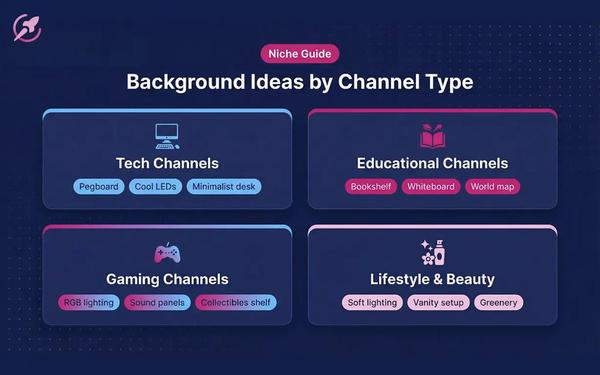
Your YouTube background is the unsung hero of your video's production value. A great background makes you look professional, builds trust with your audience, and helps tell your story before you've said a word. A bad one does the opposite: it distracts viewers, looks unprofessional, and can make your content feel cheap, even if the information you're sharing is excellent.

A good background is an essential part of becoming a YouTuber. Many creators believe a high-qual...

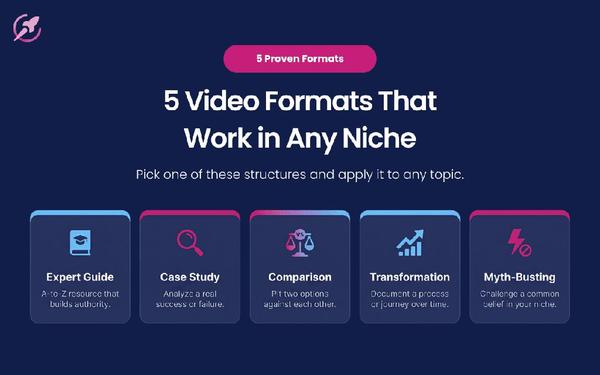
How to Build YouTube Channel Ideas That People Actually Want to Watch

Every creator knows the feeling: you spend days scripting, filming, and editing a video you’re passionate about, only to see it flatline with a handful of views. It’s discouraging, and it’s the number one reason creators burn out.

The problem usually isn’t the quality of the video: it’s the idea itself. Most creators start with what they feel like making, hoping an audience will appear. This is a recipe for slow growth and frustration.

Successful channels operate differently. They don’t guess...

The Pros and Cons of AI in Healthcare: What Software Teams Need To Know

AI is now a core part of many healthcare platforms, from triage bots to claims automation to risk scoring systems. 


While the industry talks about the clinical side, software teams carry much of the responsibility for making sure these tools behave the way they should. The quality of the system depends on how well the underlying models, data flows and integrations are tested.


Understanding the pros and cons of AI in healthcare helps engineering and QA groups decide how to build safer softw...

AI Prompt Engineering Best Practices: Build Better Tests with ContextQA

AI prompt engineering has become part of everyday testing work as teams rely more on AI to generate test cases, flows, and datasets. In software testing, prompts are not casual inputs. They are instructions that determine whether generated tests are usable, repeatable, and aligned with real product behavior. When AI prompt engineering is handled carefully, teams reduce rework and gain more trust in the results.


ContextQA applies prompt engineering specifically to test generation. Instead of t...

What Is a Prompt in Generative AI? How to Be More Accurate For Testing - ContextQA

Let’s start with the basics. A prompt is the text or input that tells a generative AI model what to produce. Essentially, it’s the instruction that tells the AI what you need it to do.


The model uses that input to create an answer, generate code, summarize content or guide an action inside a product. Prompts can be short, long, structured or open: they just need to be clear and descriptive enough to show what you want. The way they are written shapes how the model responds.


QA teams face n...

Intelligent Process Automation Examples: Real-World Use Cases

Intelligent process automation brings together automation and AI to handle tasks that used to require hours of manual effort. For software developers and QA teams, this shift helps reduce bottlenecks, clean up workflows and improve release stability. It is now common in digital products, support tools, cloud infrastructure and internal operations.


Intelligent process automation essentially blends three components: automation tools, AI-driven decision steps and data handling. Together, they he...

Benefits of Test Automation for Developer and QA Teams

Test automation is now a standard part of modern software work, across multiple industries. It helps teams handle growing product complexity, faster deployment cycles, and rising expectations from users. Instead of repeating the same steps by hand, developers and QA testers rely on automated checks to confirm how the system behaves across environments.


Tools like ContextQA support this shift by giving teams visual flows, reusable models and clear patterns that help uncover issues early.


Au...

Intelligent Automation Benefits: How AI Improves Testing Speed and Accuracy

Intelligent automation blends traditional automation with AI-driven decision steps. For software teams, this means faster checks, clearer patterns and less time spent on tedious work. As applications grow, manual testing alone cannot keep up. Developers and QA testers turn to automated workflows that collect data, run tests and detect issues without constant supervision.


ContextQA supports this shift by helping teams capture full user paths through recorders and visual models. These automated...

How to Use AI to Automate Tasks in Your Developer Workflow

AI has moved into everyday development work (and everything else). It reduces manual steps, shortens review cycles and helps teams keep up with frequent updates. 


Knowing how to use AI to automate tasks is becoming a basic part of building and maintaining software. Developers handle new features, bugs, test updates and deployment steps, so AI support can remove busywork and help teams focus on meaningful decisions.


ContextQA fits into this shift by giving teams visual models, recorded flow...

Top 9 Benefits of AI in eCommerce: What Teams Gain From Intelligent Automation

AI is now embedded across modern eCommerce platforms, from search and recommendations to pricing and customer support. For development and QA teams, this creates a different challenge: not understanding what these systems do, but reliably building, testing, and maintaining them as they change.


AI-driven features introduce dynamic behaviour that is harder to predict and harder to validate. Small updates to models, data sources, or logic can alter recommendations, search results, or pricing pat...

QA Best Practices That Support Faster, Safer Releases | ContextQA

With a jam-packed software development landscape, the pressure to release new features quickly is huge. However, speed without quality is a recipe for disaster. Bugs, glitches, and poor user experiences can erode customer trust and damage a brand’s reputation. This is where a strong foundation of Quality Assurance (QA) becomes critical. 


By implementing and adhering to trusted QA best practices, development teams can confidently accelerate their release cycles without compromising on the stab...

Salesforce Testing Best Practices That Prevent Costly Production Failures | ContextQA

Chances are, Salesforce is the lifeblood of your business. It’s where you manage your customer relationships, track your sales, and run your marketing campaigns. So, when something goes wrong, it can have a major impact on your bottom line.


That’s where Salesforce testing best practices come in. A solid testing strategy can help you catch bugs and prevent costly production failures before they have a chance to impact your users. But with so many customizations and integrations, testing Salesf...

The Best AI QA Platform for Test Automation (2026)

TL;DR: An AI QA platform uses AI to author, run, and maintain tests, adding plain-English test creation, self-healing, and root-cause analysis on top of cross-browser execution. Around 72% of QA teams now use AI but only 15% have scaled it, and a platform built around AI is how you close that gap. This guide covers the 2026 adoption data, the must-have capabilities, how platforms compare, and how to choose.


What is an AI QA platform? Software that uses AI to author, run, and maintain automate...

This is How to Reduce Manual Regression Testing Without Losing Coverage | ContextQA

Let’s be honest, nobody really likes manual regression testing. It’s tedious, time-consuming, and let’s face it, a little bit boring. But it’s also a necessary evil. You have to make sure that your new features haven’t broken anything, and that means re-running a whole bunch of tests every time you release.


But what if there was a better way? What if you could reduce manual regression testing without sacrificing coverage? It sounds too good to be true, but it’s not. With the right strategies...

What You Need to Know About Choosing Performance Testing Tools That Work | ContextQA

So, you need to do some performance testing. You know it’s important, you know it can save you from a world of hurt down the road. But where do you even start? There are a million and one performance testing tools out there, and they all claim to be the best. How do you cut through the noise and choose the right one for your team?


It’s a tough question, but it’s one you need to get right. The right performance testing tools can make all the difference. They can help you catch bottlenecks earl...
Load More

Hi there! I'm Kumari, and I write things.

I'm a freelance copywriter, content specialist, and general word-wrangler based in the North West, UK. Get in touch for a chat about a project, or almost literally any other topic.


Follow Me